Do you know WordPress websites that get active engagement on their comment section are more likely to rank better in search rankings?
In the past, people did not keep an active comment section because of all the spam that they used to get. But with better comment management plugins, managing spam on the comment section has become easier. So, in this article, we are going to discuss some of the best comment management plugins that you can use for your websites. But before we discuss them, it is important to understand how comments help your website.
How WordPress Comments Help Your Website?
An active comment section means people are not only coming to your website pages but also engaging with it. They ask questions, comment about their ideas, and even engage in debates with fellow commenters. The idea behind a comment section is to stir debate, to make people start a discussion about topics, or to engage in controversies.
Doing all this adds value to your posts and shows that your readers are active and they tend to keep an opinion about what you write. This has two benefits for you:
- More people are likely to comment on blogs where they see other people writing thoughtful comments
- Google and other search engines are going to rank these blogs higher because they see people engaging with them actively
How WordPress Handles Comments By Default?
It is also important to understand why you need a WordPress comment plugin to manage your site comments. By default, WordPress only offers the Akismet comment plugin. This plugin puts all comments with links in spam and others as published. With the Akismet comment plugin, you have two problems. You can’t know for sure which comment is genuine and thoughtful and which one is spam with this plugin. Apart from that, WordPress provides a manual interface to manage and delete comments. This interface can take hours to clean your comment section.
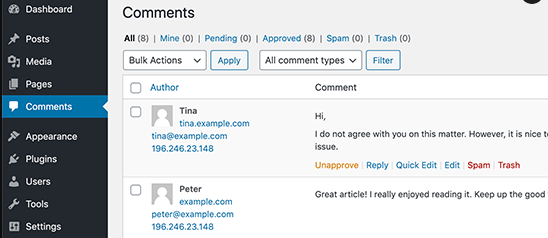
If you get comments often on your blogs and are tired of all the hours it takes to clean then, then this blog is for you.
List of Best WordPress Comment Plugins for Engagement
Let’s learn about the best comment plugins that you can use for site engagement, management, and controlling spam.
-
1. Disqus
First in our list is the Disqus comment plugin. Disqus is known for its own comment management platform. With Disqus, you are technically changing the WordPress comment section. To get started, you will first have to create an account on Disqus and then connect it with your WordPress Disqus plugin using an API. Once all that is set up, you can replace it with your current comment section.

The benefit of using Disqus is that people can easily drop a comment on your website if they have a Disqus profile. They can also use Facebook, Google, and Twitter accounts. If you enable the ‘Guest commenter’ option, then people will also be able to leave a comment using their email ids.
Pros of Using Disqus WordPress Comment System:
- Visitors can upvote, downvote, and share comments to their Twitter accounts
- Disqus comments can also be managed through the Disqus website
- You can easily import, export Disqus comments
- Disqus automatically removes spam from their website if you add ‘stop words’
- You can also disable links in comments so that people don’t add comments just to get a link back to their websites
- Disqus also offers multiple templates for your comment section
- You can also enable the Disqus blog recommendation feature so that visitors can directly visit other blogs on your website when they get to it
- Disqus comments can also be synced with your WordPress database automatically
- You can use lazy loading with Disqus comments to improve site performance
Cons of Using Disqus WordPress Comment Management System
- Users have to register to post a comment on your WordPress website.
- Disqus uses your commenters’ data to advertise to them.
- Often Disqus uses your comments to insert affiliate links and earn through commission. This is for the free Disqus comment section only.
-
2. Jetpack
Jetpack is not a comment management plugin but it is a lot more than that. Jetpack is part of the Automattic offering – the group behind the WordPress platform itself. It upgrades the comment section by allowing users to comment using their social profiles.
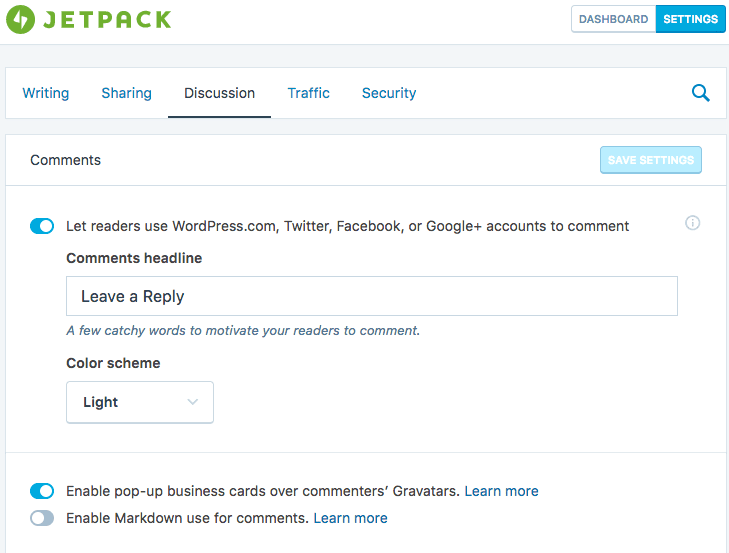
If you get a lot of comments from genuine users, it only makes sense to make commenting easier for them. Jetpack does exactly that for your website users.
Pros of Jetpack
- Users don’t have to manually fill in the information, Jetpack extracts their social profile data so that they can comment on your site.
- Jetpack can also change the color scheme of your comment section
- Users can also have their business card display on their comments if they have signed-up with WordPress.org.
Cons of Jetpack
- It is not free. Pricing starts from $3.50 only

Best in Class WordPress hosting and maintenance services for only $27.5 a month
Launch your first site for free
-
3. Reply Box Comment Plugin
ReplyBox comment platform is another user-friendly WordPress plugin that can help you easily manage your WordPress websites. With the ReplyBox plugin, you don’t have to use the WordPress comment section, because it has its own comment platform just like Disqus. It also doesn’t have any privacy concerns like people have with the Disqus platform. You can also use social logins to comment on a website or you can create an ID with Reply box.
Since Reply box is itself a comment platform, your server stays free from excessive comment load. It also supports lazy loading. Replybox is a paid service for websites that get a lot of comment-based engagement.
Pros of ReplyBox Comment Plugin
- Spam protection by Akismet plugin to weed out any unnecessary comments
- A single platform just like Disqus. Users can comment using their social profiles
- Offers import/export functionality so that you can easily import comments from another website to your Replybox comment section – useful if you are managing comments from a single dashboard
- Customize the design of your comment section using code
Cons of ReplyBox Comment Plugin
- Anonymous commenting not supported
- Replybox monthly subscription starts at $10 per month
- Doesn’t support WordPress authentication. You need to log in using your social profile
-
4. WPDiscuz
WPDiscuz markets itself as the WordPress comment alternative. It offers multiple brand new features that are not available with the current WordPress comment box. Moreover, it is completely free unlike Replybox and doesn’t have any privacy issues like the Disqus platform.
It offers modern, clean layouts for pages and posts and also supports a custom comment form builder. So, in short, you can customize the comment box in any way you want.
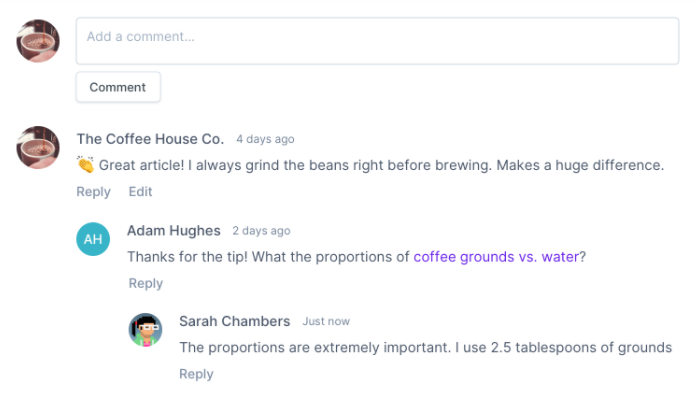
Another feature that is only available with WPDiscuz is that you can comment on a specific line within the article or within another comment. See the image.

It also supports rating comments made by other users – a feature similar to Disqus’ voting feature.
Pros of WPDiscuz Comment Platform
- Live comment updates and real-time reporting using Ajax
- You can see the comment statistics on the WPDiscuz dashboard
- Also supports anonymous commenting just like the actual WordPress comment section
- Readers can comment on a single line of the post or another comment
- Can break long comments into a wrapper using ‘Read more’ text
- Offers 100+ comment related feature in a free comment platform
Cons of WPDiscuz Comment Platform
- Design is not as great as the Disqus comment platform
-
5. Postmatic
If you want your users to stay informed about their comments and others’ replies to them, then Postmatic is the solution.
With this plugin, your subscribers can get your content in their emails. They can also leave a reply just by replying to the email. No-fuss. It is as easy as hitting the ‘Send’ button.

Your users can also opt into your offers, or engage with your popups – both are offered by Postmatic.
The plugin is not free and it starts for $20 for around 10,000 subscribers.
Pros of Postmatic Comment Plugin
- Send content to users through email
- Users can stay updated about engagement on their comments
- Users can leave a comment just by hitting reply to your emails
- Offers pop-ups and opt-ins
Cons of Postmatic Comment Plugin
- Costs $20 per month
- Doesn’t offer a lot of comment management functionality to users
-
6. Thrive Comments

Thrive Comments is trying to revive the way comment engagements take place on a blog or a website. People comment on their social media profiles and get likes and replies from other users. Thrive is trying to implement the same functionality on blogging websites. The intent is that if people’s comments get likes and upvotes from others, they are more likely to respond on the website. In a way all this creates a social forum on the blog, people comment and then other people respond or like their posts.
Pros of Thrive Comments Plugin
- People can upvote or like comments of other commenters
- People can comment using their social media profiles such as Facebook, Google, and Twitter
- Website owners can see data of how their blog comments are performing
- They can remove spam comments through stop words and checklists
- Comments can automatically add resource links from the same website using deep mining
- Site owners can delegate comment moderation tasks to team members
Cons of Thrive Comments Plugin
- Doesn’t offer on-site management like comment box customizations
- Doesn’t offer multiple text formats
-
7. GraphComment
GraphComment is another great comment management platform that offers a lot more features than the WordPress comment section. The aim of the GraphComment plugin was to reinvent how discussions take place online. The creators wanted that comment-based discussions to stop being bland & boring and start being creative, engaging, and fruitful. That’s why they added a quality discussion algorithm to their platform. With the ‘quality discussion’ grading, users can easily see discussions that got the most likes and upvotes.
Pros of Graph Comment
- A completely new interface for your comment section that puts most engaged comments first
- Turns comments into threads where new visitors can easily engage
- Likes, upvotes, replies, and shares all available for each comment
- Automated registration through social profiles
- Multiple themes for the comment section. Easily customize it at will
- Community profile for each user
- Notifications through dashboard and plugin
- Sliding comment panel so that users can easily see the replies to their comments
- Badges and awards for top commenters on your website
Cons of GraphComment Comment Plugin
- Can be overwhelming for a beginner due to all the features it offers
-
8. Lazy Load Comments
Lazy Load is a great comment plugin for all those who are looking for performance optimizations for their websites. It comes without any hectic configurations. You just have to install the plugin and it will automatically put the comment section on lazy loading so that the site loads faster.
Pros of Lazy Load Comment Plugin
- Faster website loading
- Reduced number of HTTP requests
- Lazy loading of comments Gravatars
- No complex configuration needed
Cons of Lazy Load Comment Plugin
- Limited configuration
- Limited functionality
-
9. Comment Popularity
Comment Popularity is a simple plugin that makes your comment section a subreddit. Not in the literal sense, but it does add an upvote and downvote option for each comment posted on your website.
Users can vote for comments, reply to them, and increase engagement on your blog pages. The best part about all this is that you don’t have to configure anything because the comment popularity plugin works just by itself.
It also adds a ‘Karma’ section just like Reddit. So, when a visitor comments and another visitor upvotes that comment, the commenting visitor gets karma for commenting.
Pros of Comment Popularity Plugin
- Easily add a voting section to your website/blog
- Increase site engagement
- No need to configure the plugin
Cons of Comment Popularity Plugin
- Doesn’t offer a lot of options
Best in Class WordPress hosting and maintenance services for only $27.5 a month
Launch your first site for free
List of Best WordPress Spam Comment Plugins
Here is a list of WordPress spam comment controlling plugins so that you can be at peace.
-
1. Anti-spam
Anti-spam is a great plugin for users who would like to improve the way they moderate comments. With the Anti-spam comment plugin, site owners don’t have to add captchas or spend long hours moderating queues of comments. Instead, they can simply add the anti-spam plugin and it will automatically control spam comments. It has an intelligent algorithm that automatically detects spam and assigns points to them. When comments have more points, they are automatically put on the spam list. You can also add stop words. If commenters use them, they are automatically added to the spam list. Anti-spam is a great way to improve commenting on websites while also weeding out spam and unnatural comments from your blogging site without any manual efforts.
-
2. Spam Destroyer
Spam Destroyer is just what it is named as: It destroys spam from your comment section. The plugin is automated and you don’t have to configure it at all. When you install the plugin on your website, it automatically detects spam and puts it in the spam queue. You can then manually go through the spam queue and remove the comments that are actually spam. To weed out spam comments, the spam destroyer plugin uses a cookie and a hidden input field. When bots try to comment on anything on your website, the spam destroyer checks for the cookie and the hidden input field and then marks bot comments as spam.

-
3. Stop Spammers
Stop Spammers is another great plugin to stop spam from your website. The stop spammer plugin works for comments, registrations, emails, and subscriptions. It weeds out comments by IPs, suspicious user behavior, disposable emails, URL shorteners, TLDs, country domains, private mode on the browser, firewall protection, and a lot more indicators. The Stop spammer plugin is not just for handling comments. But the best part is that it actually works without configuring a lot on your website. Especially if you are a beginner, the Stop Spammer plugin can help you a great deal.
-
4. WP Bruiser
WPBruiser is another great commenting plugin that you can use on your website to handle spam comments and manage engagement. It protects your website from comment spam, hacking attempts, cyber-attacks, bot logging, and a lot more. It does that by adding advanced security to your website. It also supports multiple extensions that you can add to your website for security enhancements.
List of Comment Import/Export Plugins
If you want to import comments from your previous installation to the new one, you would need a comment import/export plugin. Here are a few that you can use.
-
1. WordPress Comment Import/Export
WordPress comment plugin is one of the easiest to import/export. It lets you easily export comments from one installation of WordPress in CSV file format and then import them to your new installation. You just need to have the plugin installed on your website when you want to import the comments and that is it. It can easily import comments from your site pages, posts, and product section. You can also schedule exports from your website using the FTP client.
-
2. WordPress Comment Link Removal
Next, we have the WordPress comment link removal tool. It is beneficial for all those who would like to remove excessive links from the comments they get. Most comments are from SEO experts and link builders that want to get a link for their website. With the Link Removal tool, you can literally remove all these excess links from comments with the click of a button. The comment link removal tool will also help with bot spamming and remove any links that you will get as spam on your WordPress website.
Bottom-line
So that’s it. These are all the plugins that you would need to manage your WordPress comment section. Whether you want to add a comment management platform, weed out unnecessary and spam comments, remove links, or just import comments from your current installation to another one, these plugins can help you do that easily.
You can start with any comment plugin available in the list. If you are not sure which one to start with, then simply select the first one in the list and test it on your website. Simply test all as all of them have a trial version available, and then move to the one that works best for you.
Are you using any other comment management plugin? Tell more about it in the comments section below.
Let us manage your WordPress Website and attain true peace of mind.
Scale your business today.